Introduction
Forecasting is a key component of any planning model. The forecast (including manual adjustments aka effective forecast) is used for calculating the Projected Stock , and enabled effective planning against Target stock level (see Manage Stock Factor Target Stock Levels ).
In equipment planning, the forecast consists of Export Pick-Ups (containers leaving stock for export) and Import Returns (containers entering stock after import). A commonly useful data is also the Imbalance = Import - Export.
Maersk equipment planning is currently uses autoforecast that has been available by Transported by Maersk for several years. It is based on 5 years of data with proven accuracy (significantly more than 90% on many equipment types and geographical locations) and takes into account factors such as seasonality, holidays, exchange information. It is provided on pool level and ROCK historically has a mechanism to split it further into site level using historical import and export .
This section describes how use the Forecast screen. Access to it is governed by User Roles & Permissions
Contents
Overview of the forecast screen
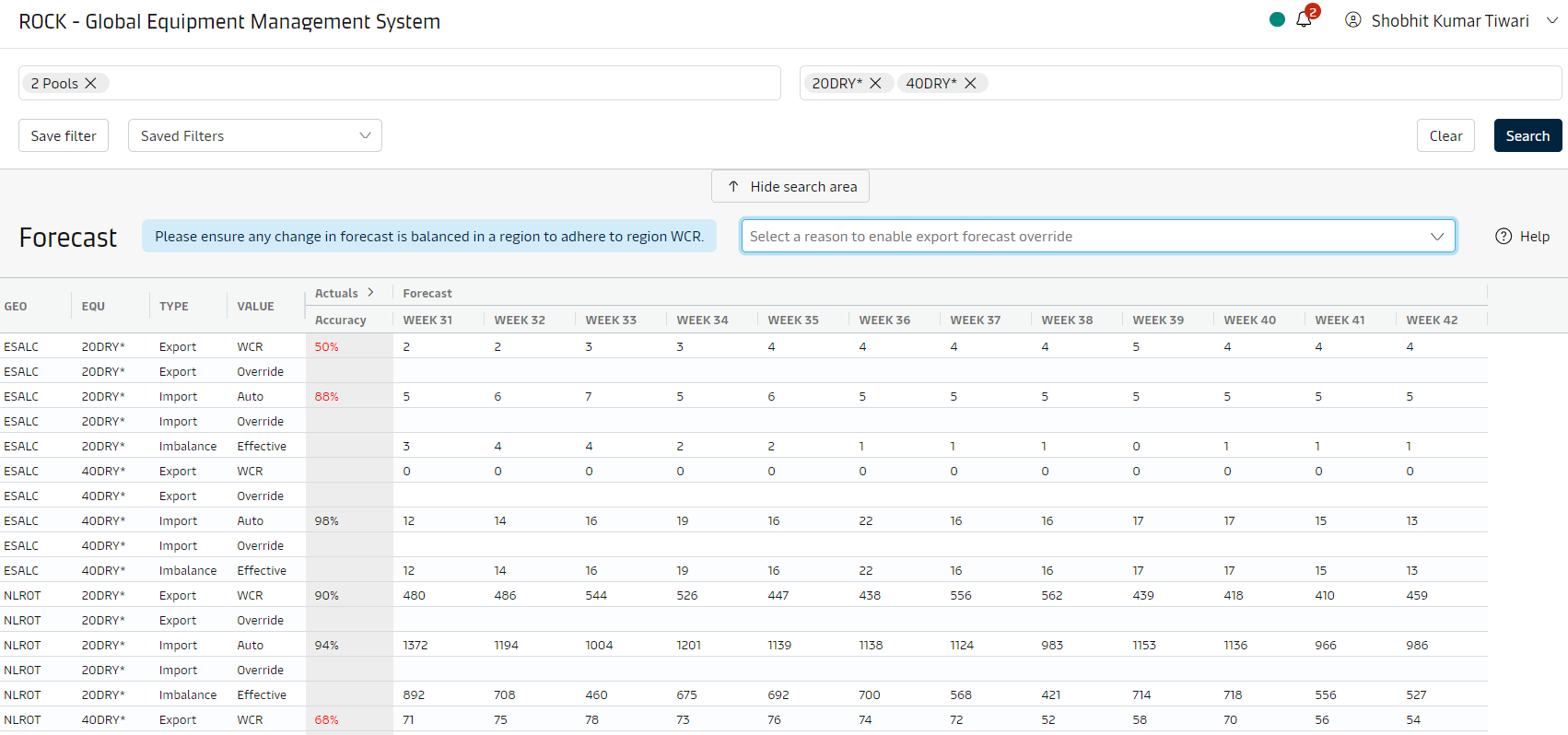
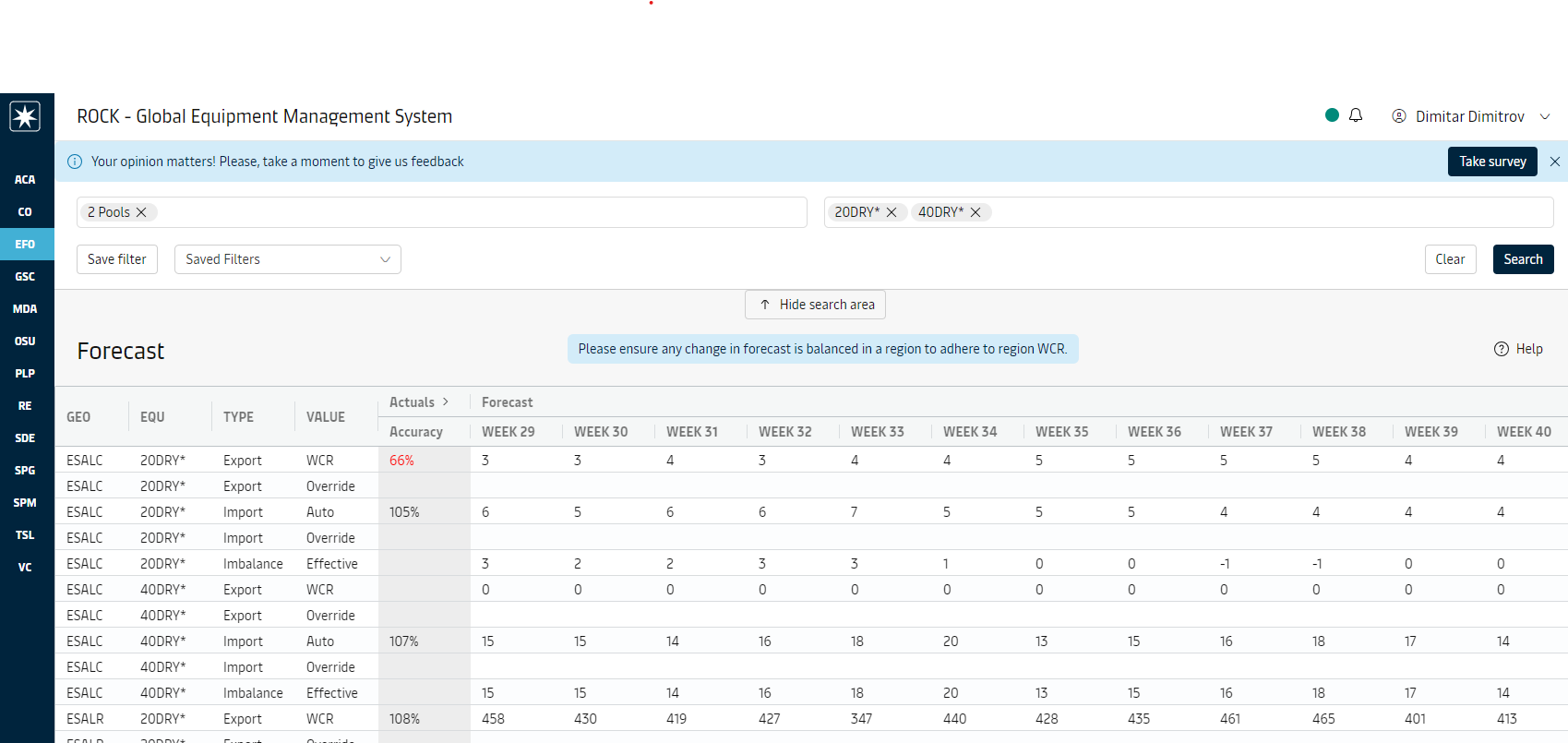
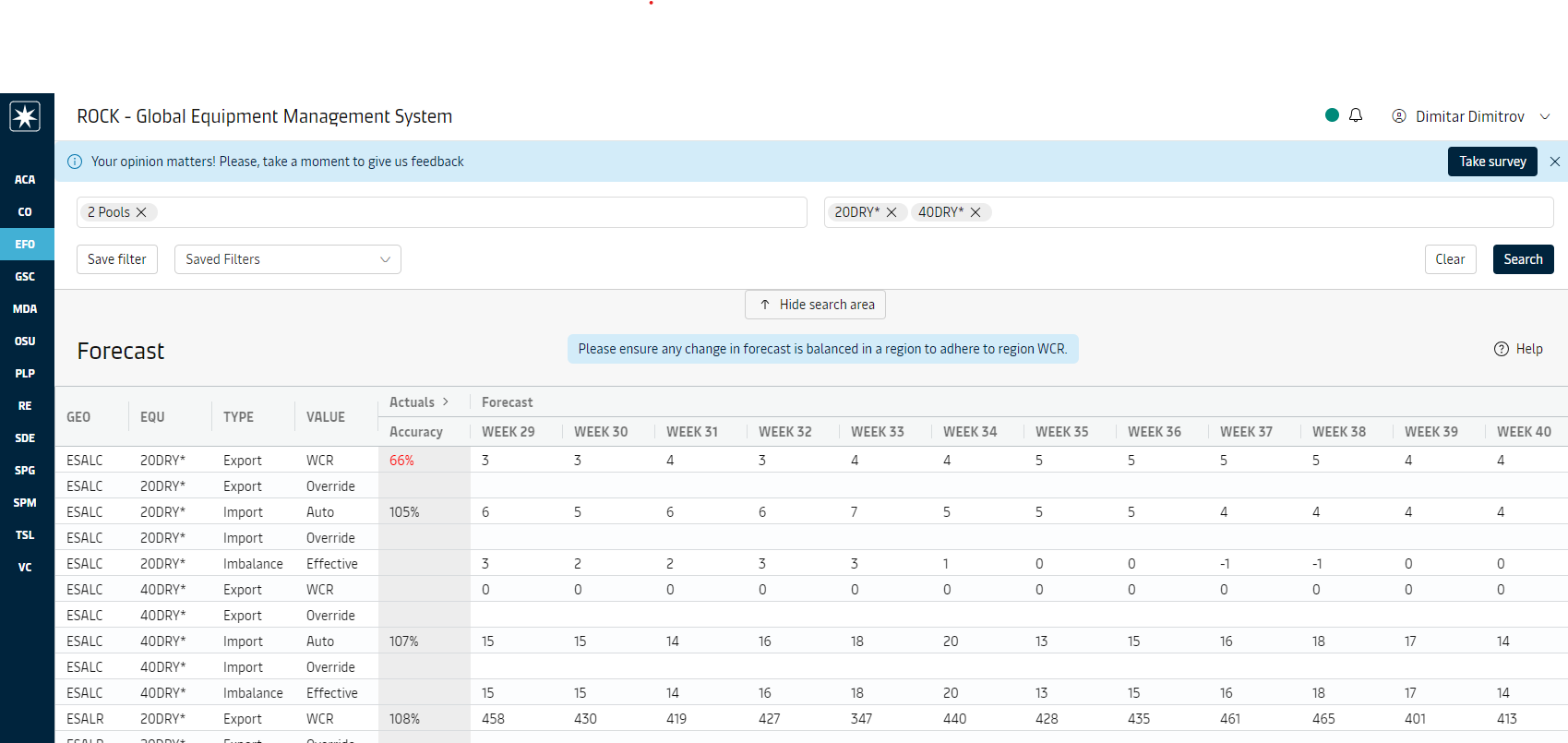
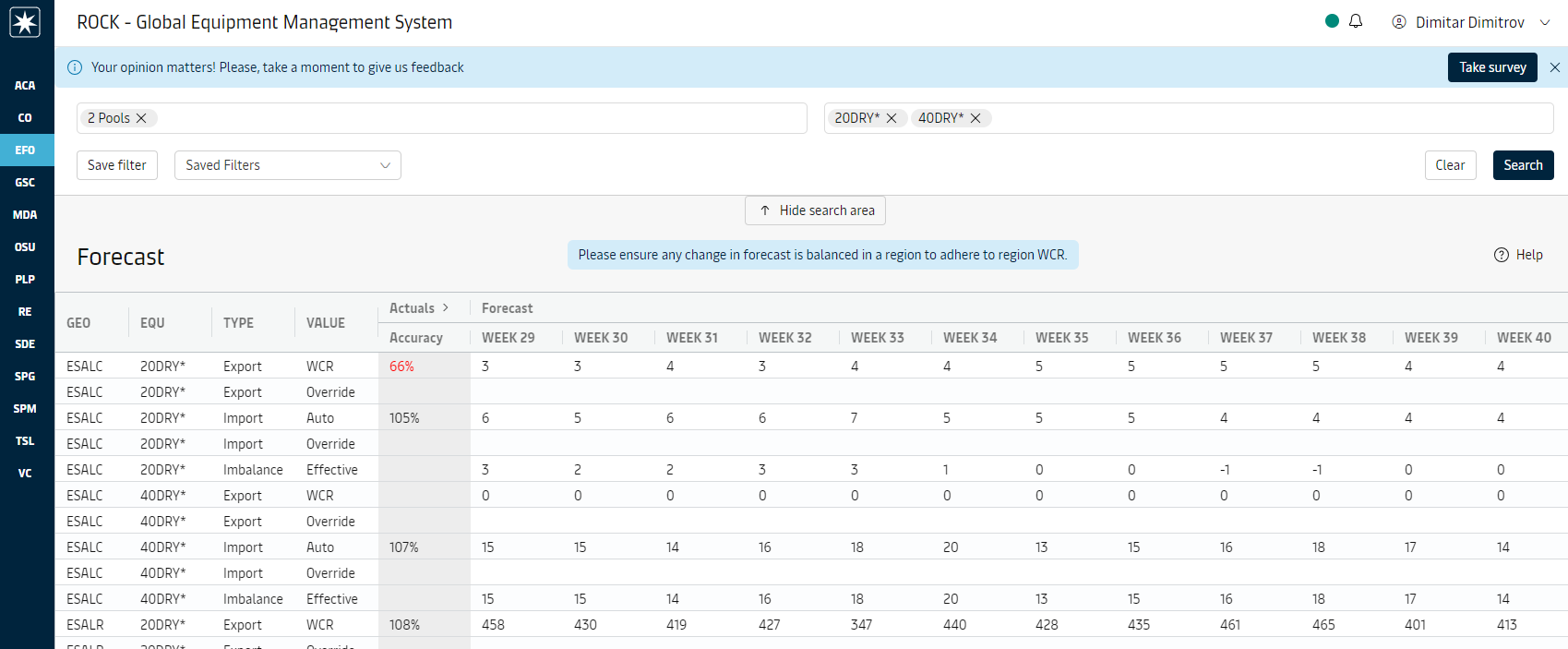
The search area on top allows for selecting geographical areas and equipment groups to search for.
In the grid there are rows for each location-equipment group with data where each row is either about Export, Import or Imbalance. There are also 2 rows each for Export and Import depending on whether it is the original value or a manual override. This applies to the current and future weeks.
Additional features include:
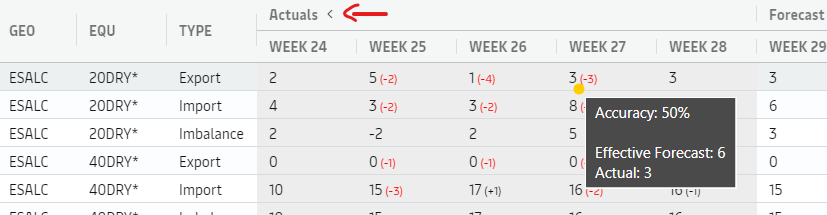
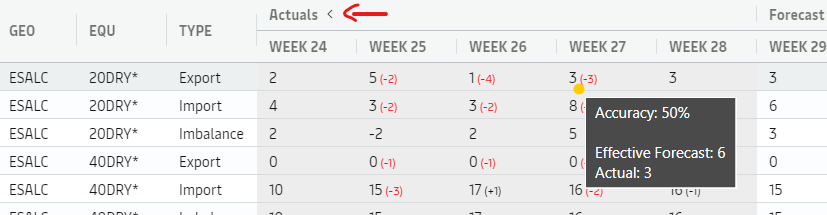
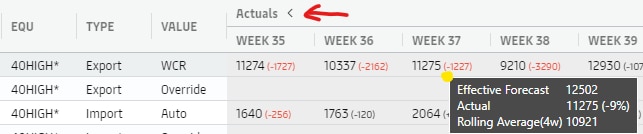
Actuals group of columns (in gray) initially shows aggregated forecast accuracy percentage across 5 weeks (for the past 5 weeks: sum of all actuals / sum of all effective forecasts).
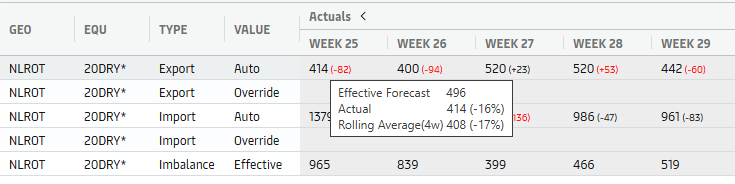
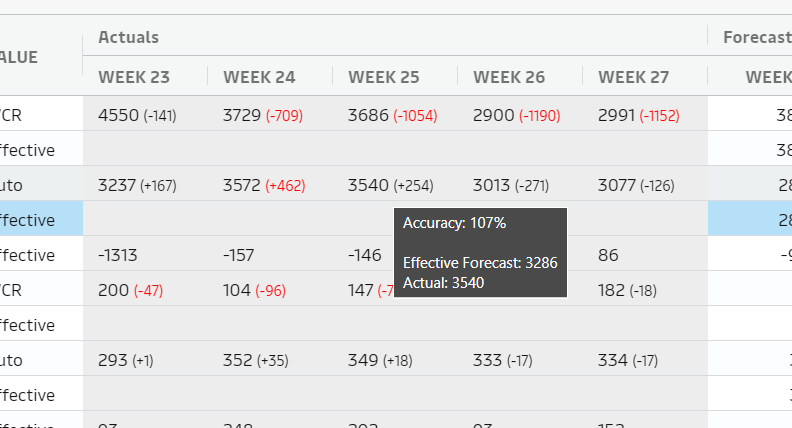
Expanding the column group reveals the weekly data on the actuals including an “Effective forecast (incl. overrides) accuracy” indicator. The format is Actuals (Difference from Effective forecast). If the difference is more than 10%, it is colored in red
More details are available in a tooltip.
Users can export data by “right clicking” on the grid

Forecast for Equipment operators
Equipment operators engage in conversations on multiple levels in order to establish planning that is realistic and feasible. They need to have overview of their area of operations, signals when forecast might need attention and ability to intervene and manually override the forecast values.
Overview of area of operations can be retrieved by utilizing the search functionality. For often used search combinations, saved filters are recommended to be used.
Going forward, there is desire to tailor ROCK more to the specific role and to provide actionable insights (signals and traceability) for Equipment Operators.
Overriding numbers manually
Equipment operators are able to override forecast numbers on pool level after selecting a reason for override using the dropdown menu available above the grid. Once selected the reason applies to all overrides made. User should select appropriate reason if a different reason applies to the value that is being overridden.
Reason is required to override, and the cell will not be editable unless a reason is selected by user.
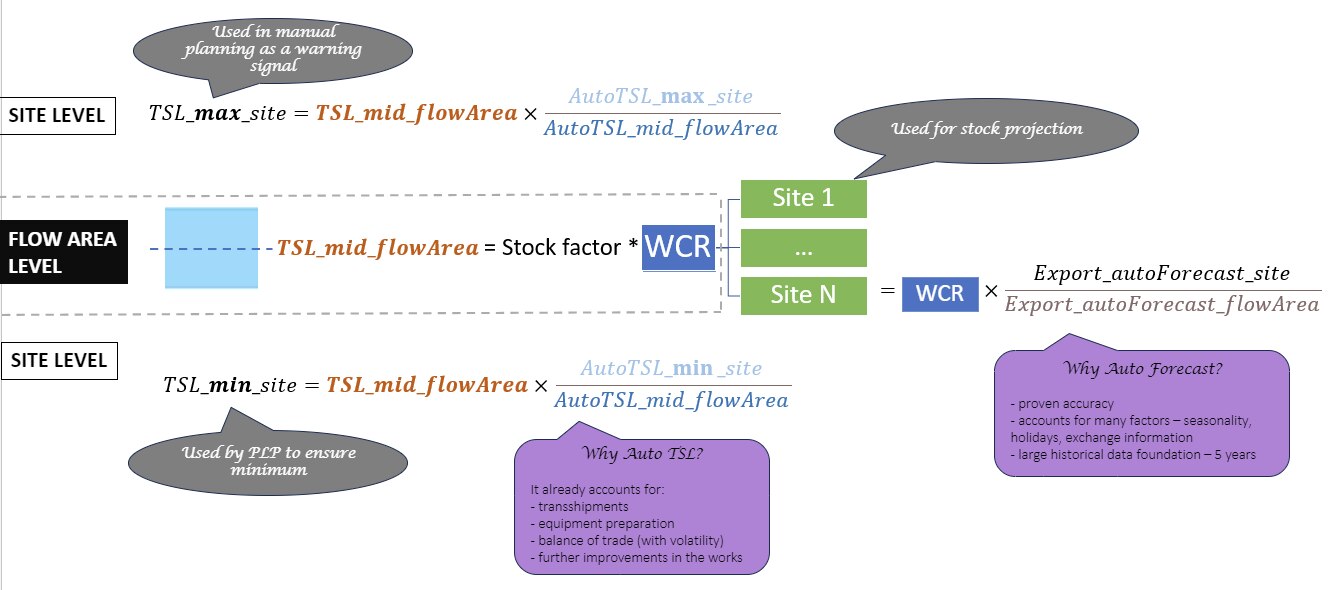
Pool level is considered the right granularity to both maintain control and keep the overriding overhead manageable. ROCK keeps record on the lowest geographical level - site - as it allows aggregation back up to any higher geographical level. When a number is overridden on pool level, it is automatically split to all sites under the pool using split ratios .
In the process of splitting, due to rounding the pool number originally input by the user might be slightly different than the number the system has in the end.
While overriding on site level can be useful in specific geographies, where e.g. inland flow is not too heavy or ingrained part of the planning process yet, there are several thousand sites and working at that granularity is a significant overhead. While Managing Target stock level allows additional mechanisms to influence how pool numbers are split across sites, doing the same for Forecast is currently not considered necessary, especially with eye on a future where inland planning is used globally thus managing on site levels becomes heavy for human efforts.
Managing Super Freezers (40MSFU*)
Managing Export forecast for Super Freezers (40MSFU* equipment group) follows a different process due to the nature of the flow - high yield, low volumes with hardly predictable patterns. Users with ManageSuperFreezers permission (those can be found via a search in User Administration) are presented with a separate tab in Forecast screen where they can:
view of the 40MSFU* export forecast globally
override the forecast globally
Forecast for Flow managers
Flow managers require forecast visibility at higher geographical levels, such as country clusters or flow areas. They can utilize the geography filter to view forecasts aggregated at these broader levels

Insights
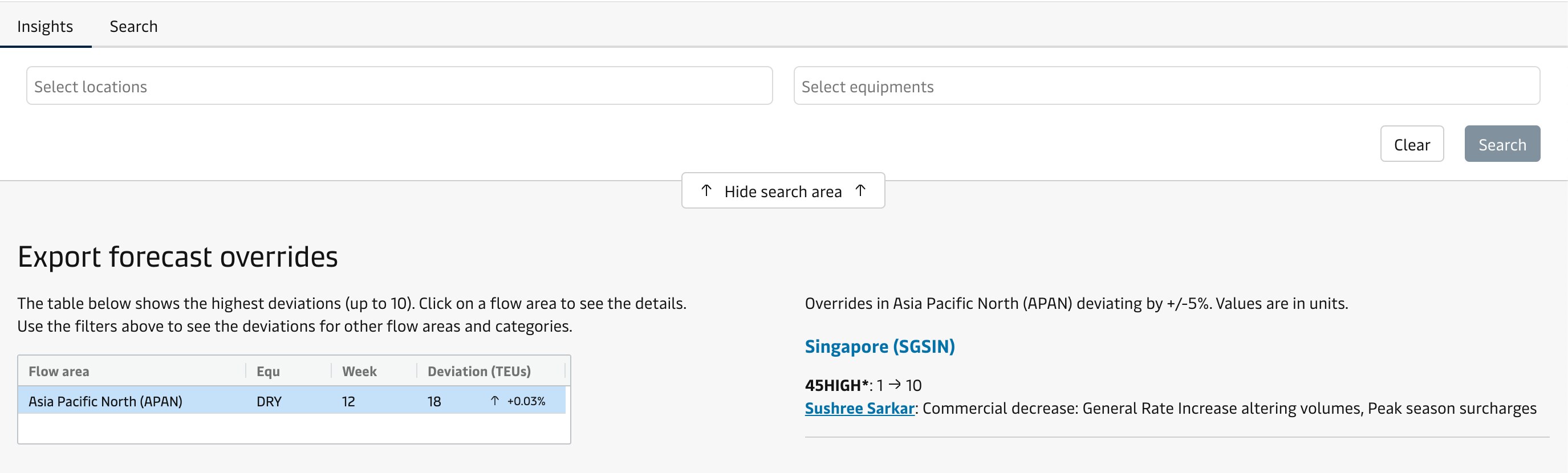
This shows the highest deviations at the flow area level. It is possible to search for deviations for specific flow areas and equipment categories.
Attachments:
 image2018-9-26_13-42-37.png (image/png)
 Rock_ForecastAccuracy_6c0450f0-6c07-471d-8848-17c233186b9a.xlsx (application/vnd.openxmlformats-officedocument.spreadsheetml.sheet)
image2018-11-13_15-7-31.png (image/png)
Rock_ForecastAccuracy_6c0450f0-6c07-471d-8848-17c233186b9a.xlsx (application/vnd.openxmlformats-officedocument.spreadsheetml.sheet)
image2018-11-13_15-7-31.png (image/png)
 image2018-11-13_15-9-31.png (image/png)
 image2018-11-13_15-13-25.png (image/png)
 image2018-11-13_15-35-32.png (image/png)
 image2018-11-13_16-9-30.png (image/png)
 image2018-11-13_16-11-15.png (image/png)
 image2018-11-14_15-11-42.png (image/png)
 image2018-11-14_15-14-22.png (image/png)
 image2018-11-14_15-16-29.png (image/png)
 image2018-11-14_15-33-38.png (image/png)
 split-process.png (image/png)
 forecast-screen.png (image/png)
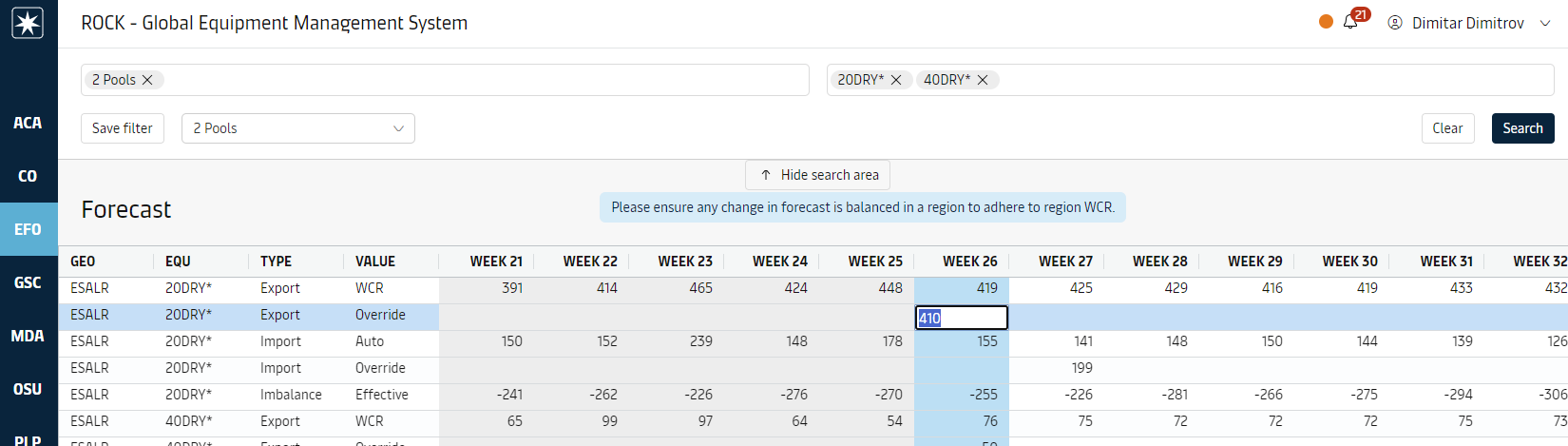 image-20240703-132541.png (image/png)
 image-20240703-132631.png (image/png)
 image-20240703-132854.png (image/png)
 regional-target.png (image/png)
 image-20240703-132932.png (image/png)
 how-to-export.png (image/png)
 past-weeks-detailed-accuracy-tooltip.png (image/png)
 past-weeks-detailed-accuracy-tooltip.png (image/png)
 forecast-screen.png (image/png)
 forecast-screen.png (image/png)
 forecast-screen.png (image/png)
 past-weeks-detailed-accuracy-tooltip.png (image/png)
 regional-target.png (image/png)
 how-to-export.png (image/png)
 split-process.png (image/png)
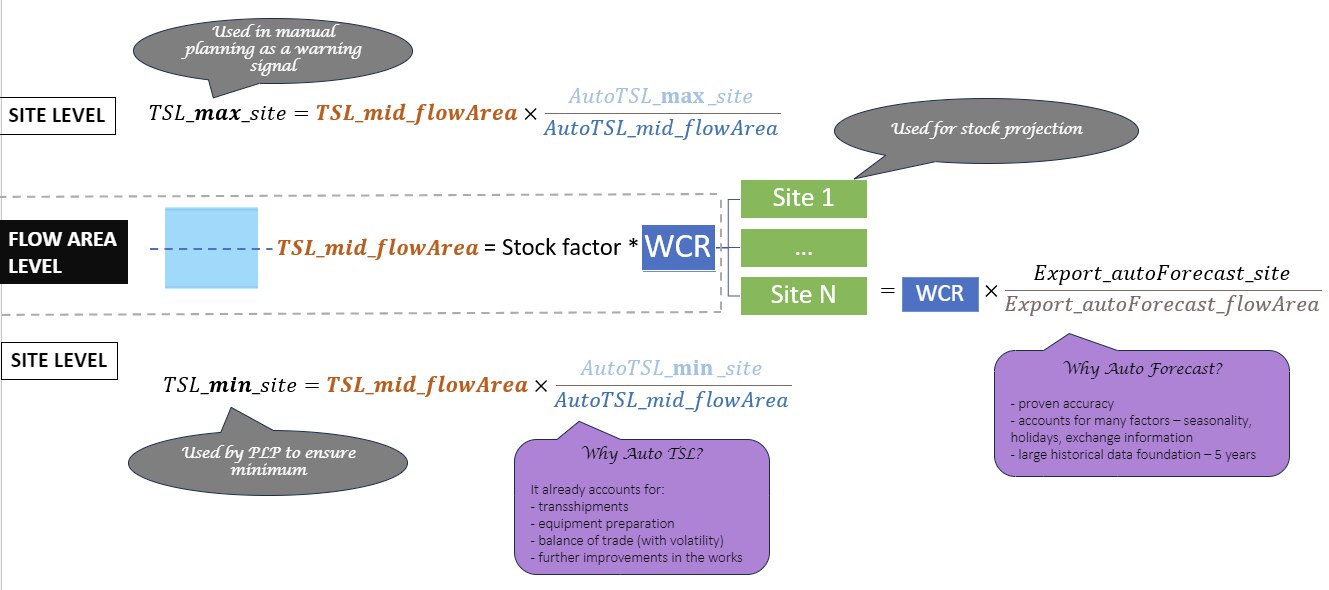 image-20240729-062948.png (image/png)
 regional-target.png (image/png)
 past-weeks-detailed-accuracy-tooltip.png (image/png)
 Screenshot 2025-02-25 at 2.58.15 PM.png (image/png)
 image-20250722-084533.png (image/png)
 image-20250722-084624.png (image/png)
 image-20250722-085009.png (image/png)
