Introduction
A “Locking” feature has been added to OTT management screens to enable user to manage when the Optimizer (PLP) can suggest new equipment volumes to the OTT. The “Locks” can be applied on two different levels; at Equipment Group level and at OTT level. The feature is accessible in OTT management screens. OTTs can be accessed via OTT Summary and Create/Edit an OTT screen.
Lock Types
OTT Locks
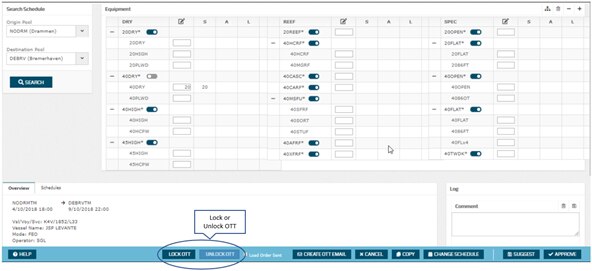
Lock OTT is a feature available on all OTTs, available only to some users (see specific permissions in User Roles & Permissions). The lock allows the OTT to be completely locked across all equipment types, thus preventing PLP from suggesting any changes to the planned flow. The "Lock OTT" action is available in the bottom panel of the screen, using the “Lock OTT” and "Unlock OTT" buttons, to lock and unlock equipment types.
The action of Approving the OTT numbers will also invoke the "OTT locked" state. The action of Suggesting the OTT numbers will not invoke the "OTT locked" state.
Vessel Call Locks
The "Days before arrival deadline" in the Vessel call screen is the deadline set for PLP preventing it from optimizing empty flows on OTTs related to this Vsl call beyond this point in time.
Ot is
Equipment Group Locks
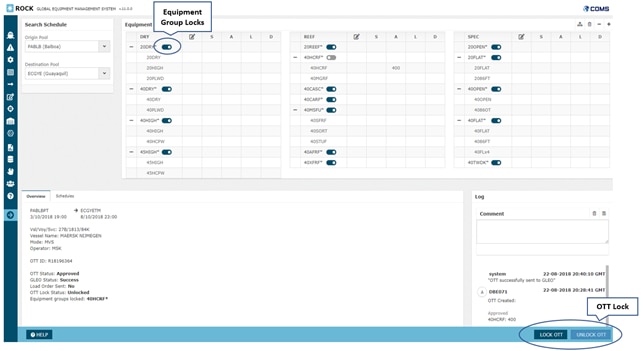
The locking option can be used on each individual equipment group on the OTT, by using the associated toggle-button available next to the equipment group headline. The lock enables the user to lock an individual equipment group on the OTT, with a desired volume, thus preventing the PLP from optimising further on the locked equipment type.
By locking equipment groups individually, PLP is still able to optimise empty flows on the remaining equipment groups of the OTT. The equipment group locks can also be enabled on equipment groups without any planned volume (suggested or approved).
When ROCK users manually create an OTT, then it is assumed that the flow should by default be respected. Because of this, when a user manually suggests or approved volume on an OTT, then the associated equipment group lock is automatically enabled (i.e. it is locked).
When an equipment group has been locked for the optimiser, either manually or automatically due to optimisation deadlines, LOC and CC users can still change the volume on the OTT, and PLP will respect the values on the OTT
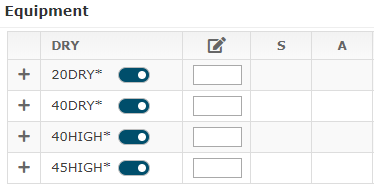
Unlocked Equipment Group on OTT Equipment Group 20DRY* is open, and PLP can modify the planned units, or even Cancel the OTT. PLP can also suggest volume of other equipment types, as they are also unlocked. |
|
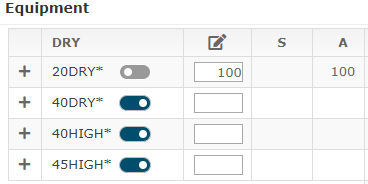
Locked Equipment Group on OTT Equipment Group 20DRY* is locked to 100 approved units of 20DRY*. PLP cannot modify these containers and will produce a solution, where the flow is included. |
|
Examples of Locks Applied
An OTT can both be manually locked by a LOC user and automatically locked by the system. These scenarios are described below, together with an overview of the how the PLP optimiser behaves, and the actions that are available to users.
| Conditions | Example | Outcome |
|---|---|---|
Locked | OTT Automatically locked due to "Days Before Arrival" deadlines | User: LOC and CC user can edit/overwrite the volumes on the OTT but they can not unlock the OTT. System: Optimizer will respect that the OTT is locked and stop optimize on this OTT. |
Equipment group manually locked due to UserSuggested and/or UserApproved volume for equipment group or sub-type. | User: LOC and CC user can unlock and edit/overwrite the volume in the locked equipment group. System: Optimizer will respect the equipment group is locked and stop optimize on the locked equipment group type on the OTT while continue to update on the unlocked equipment groups on the OTT. | |
| OTT manually locked by LOC user | User: LOC & CC user can edit/overwrite the volume and unlock the OTT System: Optimizer will respect that the OTT is locked and stop optimize on this OTT | |
Unlocked | Volume has been suggested by the optimizer but the equipment group lock is open as user haven't approved it yet | User: LOC and CC user can suggest a new volume or approve the suggested volume. System: Optimizer will keep optimizing on all equipment groups on the OTT |
| No volume has been suggested by user nor optimizer | User: Suggest and/or approve a volume System: Optimizer can suggest volumes which will be inserted in the suggested column in create OTT screen and manage OTT screen. |
Attachments:
 image2018-9-14_14-44-24.png (image/png)
image2018-9-14_14-44-34.png (image/png)
image2018-9-14_14-44-24.png (image/png)
image2018-9-14_14-44-34.png (image/png)
 image2018-9-14_14-44-41.png (image/png)
 image2018-9-14_14-45-13.png (image/png)
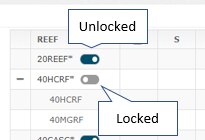 image2018-9-14_14-45-26.png (image/png)
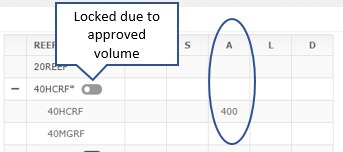 image2018-9-14_14-45-40.png (image/png)
 image2018-9-14_15-21-35.png (image/png)
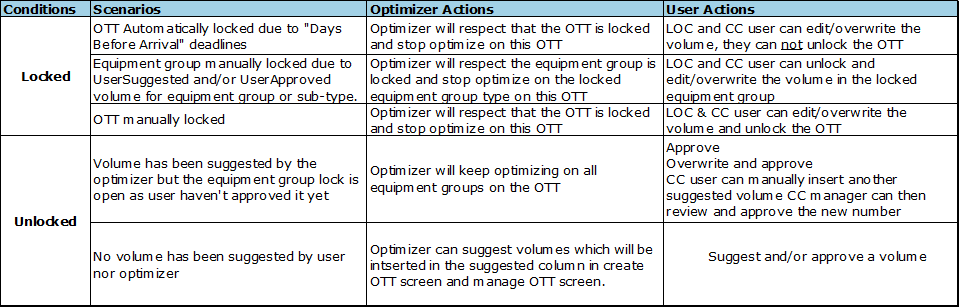 image2018-9-14_15-22-12.png (image/png)
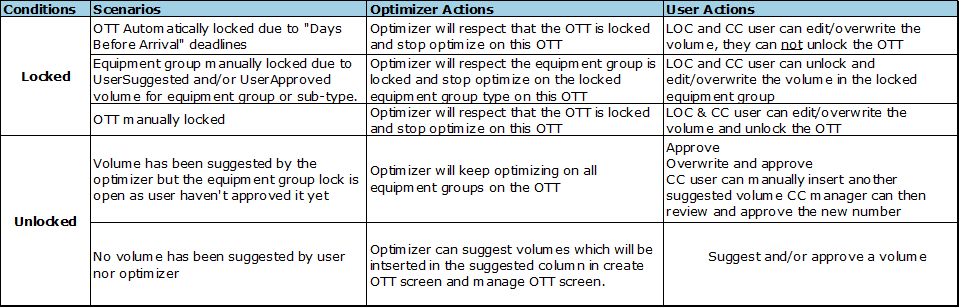 image2018-9-14_18-15-44.png (image/png)
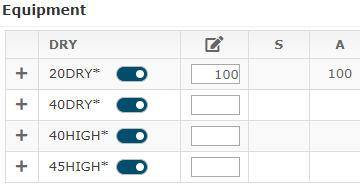 image2018-9-14_18-18-41.png (image/png)
image2018-9-17_10-25-36.png (image/png)
image2018-9-14_18-18-41.png (image/png)
image2018-9-17_10-25-36.png (image/png)