Introduction
The handling cost paid to terminal operators at the ports for load and discharge of empty containers represents a major part of the overall empty positioning cost of the company. As such, the rate for load and discharge is important information to be considered by PLP, as reducing the empty positioning cost is considered the second greatest benefit opportunity of DDFO, according to the benefit case.
The standard rates for load and discharge rates are managed by the procurement function, which uses the SRM (Standard Rates Management) module in SAP to manage and maintain vendor contracts. Once every week, DDFO receives a full update of the current valid Load and Discharge rates, through a dedicated feed. As the rates are typically in the local currency, ROCK converts them to USD using currency exchange rates updated daily from another system.
Maintaining Terminal Handling Cost For PLP
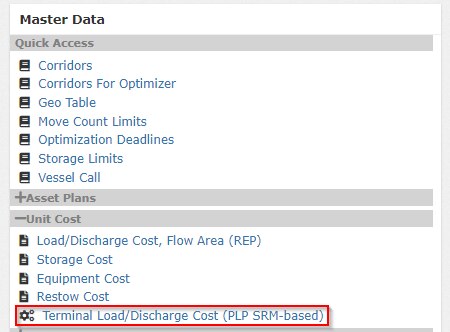
Terminal Handling Cost master data is maintained in SAP-SRM, which automatically sends all valid rates to DDFO. As a principle, any change to Terminal Handling Cost should be done in SAP-SRM and not in ROCK. However, to quickly set the effective rates and overwrite the SAP-SRM based value and allow DDFO to plan correctly, ROCK includes a workaround. The workaround consists of a file-based data input, manually managed in ROCK Master Data. Maintenance of the overwrite file is done is collaboration with GLBFLW. The raw data sourced from SRM and the overwrite file can be accessed under "Unit Cost" section in ROCK Master Data.
Validation of the data from SAP-SRM can be done by downloading the latest version, and assessing if the geo-specific Load and Discharge cost seem correct or not. If the numbers seem wrong, the local Procurement function at the LOCs should look up the numbers directly in SAP-SRM to align the contracted rates, with the system-approved rate. To assist the local procurement person, some helpful instructions include:
- From the raw data in ROCK, the load and discharge rates has an associated contract number, with the 47 number series (e.g, 4700004155). This is the system-approved rate to a given contract.
- The contract in SRM is identified under a specific 44 number series number (e.g. 4400002161).
- When searching for contracts in SAP-SRM, the 44 number series appear from the search results. To see which system-approved number has been released, use the "Tracking" tab in the system.

Calculating Terminal Handling Cost
The contracted rates from SRM constitutes the most reliable load and discharge cost data, available to be used as a baseline for most terminals. Despite of this, some problems with the data needs to be handled.
Handling Outliers In The Data
Some of the data is not always inserted correctly, and is not very reliable. To handle this cases, we use the following criteria to constitute outliers, which we ignore in the dataset.
- Lower bound: 30 USD
- Upper bound: 1000 USD
Handling Multiple Contracts
| # | Case | Description |
|---|---|---|
| 1 | Multiple Company Codes | In some cases, more than one valid contracted is available for a terminal, and thus multiple relevant rates are available. To limit rates to the most relevant one, the contracts are limited to Maersk Line only (where company code has id 1000). Note: to be updated to use Maersk Line when available, the fallback on any other available company code, if available. |
| 2 | Multiple Valid Contracts | In the case where multiple valid contracts are still identified, the rates from the contract with the highest end validity date is selected. Example: Given current day is 1/9-18, and two valid contracts are received from SRM for Terminal X. Contract 1 has 40 USD Load Cost from 1/1/17 to 13/12/18 and Contract 2 has 50 USD Load Cost from 1/1/18 to 13/12/19. In this case the second contract is used with the 50 USD Load Cost, as it has the highest end validity date. |
Handling Site Specific Cost Data
For some cases, SRM specifies more than one rate for the same site/rate combination, segregated for different brands. In this case, PLP picks the rate associated to MSK brand.
Example: Given two contracted Load Cost rates are received from SRM for Terminal X, for two operators MSK and SEA. The Load Cost for operator MSK is 40 USD and the Load Cost for operator SGL is 50 USD. In this case the rate of 40 USD is used as the default rate for the terminal, as it is contracted for MSK.
Handling Missing Terminals In The Data
Another problem with the SRM-based contracted data is that not all terminal are covered by default. To ensure relevant rates are always available to a terminal, even when SRM data does not cover it, we calculated Load/Discharge at different hierarchical levels, to enable inheritance of geo-specific averages. The data used used for this purpose includes the below:
| # | Data Description | Data Type | Description |
|---|---|---|---|
| 1 | Flow Area Averages | File-based Master Data | To simplify REP optimisation, Load and Discharge data is managed and kept as fixed values to all sites within a flow area. |
| 2 | Pool Level Averages | Calculated dynamically, based on SAP-SRM feed | Based on the available site-level data, the average load and discharge cost is calculated for each basic container category (e.g. 20REEF*) |
| 3 | Site-Level Contract Data | Calculated dynamically, based on SAP-SRM feed | Based on data sourced from SAP-SRM, the valid load and discharge cost is determined for each basic container category (e.g. 20DRY). Sample file listing the rates here: CostTerminalLoadDischarge_2018-09-25_442.xlsx |
| 4 | Site-Level Overwrite Data | File-based Master Data | To allow manual overwrite values of the site-specific Load/Discharge data, a separate file is maintained to allow overwrite of any calculated rates to a terminal. |
Using the available data, the effective cost is calculated using the following guideline:
- If overwrite data is available (#4), the effective cost is set based on this value
- If no overwrite data (#4) is available, the site-level contract data is used (#3).
- If no site-level contract data is available, the pool level average is used (#2).
- If no pool-level average is available, the flow area averages is used (#1).
Some examples are described below:
| Data | Example 1 | Example 2 | Example 3 |
|---|---|---|---|
| FlowArea | WME | NEU | WCA |
| PoolCode | ESALR | NLROT | OMSLV |
| SiteCode | ESALRTM | NLROTTM | OMSLVTM |
| Operation | Load | Load | Load |
| Equipment | 40REEF | 40REEF | 40REEF |
| REP Load Cost | 76 | 90 | 77 |
| SRM Based Pool Average | 111,71 | 86,5 | 40 |
| SRM Based Site Cost | - | 87,1 | 40 |
| Overwrite Site Cost | - | - | 50 |
| Effective Cost | 111,71 | 87,1 | 50 |
Attachments:
 image2018-8-28_14-22-39.png (image/png)
 CostTerminalLoadDischarge_2018-09-25_442.xlsx (application/vnd.openxmlformats-officedocument.spreadsheetml.sheet)
image2018-11-14_11-33-21.png (image/png)
CostTerminalLoadDischarge_2018-09-25_442.xlsx (application/vnd.openxmlformats-officedocument.spreadsheetml.sheet)
image2018-11-14_11-33-21.png (image/png)