Introduction
In order for PLP to produce an optimal empty flow plan it needs to consider the asset plans of the company, i.e. infleeting/outfleeting of containers. These asset plans dictates where new containers will be introduced and where existing containers will be removed. Without knowing the asset plans PLP will move containers to locations where they are not needed, and move containers away from locations where they are.
Because infleeting and outfleeting of containers is not managed as strictly in ROCK as container positioning, PLP is designed to suggest outfleeting/infleeting OTTs, as part of the optimised result. OTTs are introduced the same way as any other OTT (see Loading PLP OTTs in ROCK).
Outfleeting OTTs
Outfleeting is planned by the Asset team with aggregated numbers at a global level. In order to translate the aggregated numbers to very specific OTTs, a transformation of the numbers are required. To solve this problem, PLP takes the below two data sources as input to the optimisation.
- Future Outfleeting plans (i.e. aggregated numbers)
- Patterns to split Outfleeting plans to the finer granularity, calculated by ROCK
Future Outfleeting Plans
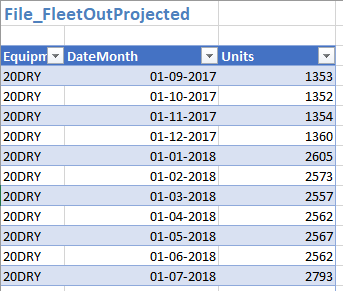
The Outfleeting plans are provided by the Global Flow team as a file-input in Master Data. The input looks like below:
Outfleeting Split Patterns
ROCK calculates outfleeting split patterns by calculating the split of RKEM disposal moves per equ site/subtype/month based on past 12 months for all equipment globally. ROCK recalculates the split patterns once per month and makes it available to PLP in Master Data Library (stored on DDFO server).
Two improvements are added to the dataset to make it more realistic
- To avoid the risk of potential late RKEM disposal move entries, ROCK ignores latest month uses date range of -1 to -13 months
- To prevent suggesting outfleeting of units in depots where stock is not available, a cap of 40% is introduced (ie. at most 40% of current stock is suggested for outfleet)
Logic to Create Outfleeting OTTs
When PLP runs, Outfleeting OTTs are calculated by applying the outfleeting split patterns as calculated above. The split results in geo specific plans, that are introduced as weekly OTTs, distributed equally across all fridays of the month, with 1 hours transit time.
Given the future date December 2019 has a projected Outfleeting number of 2000 units.
- 1000 Units of 20DRY* containers are projected to be outfleeted in December 2019.
- The latest split ratios dictates that 10% of global outfleeting units are in site NLROTTM
- PLP applied the split ratios to the monthly projection = 1000units*10% = 100 outfleeting units to site NLROTTM.
- PLP creates four outfleeting OTTs for December 2019, one for each friday.
- Each OTT is created with 100/4=25 units
- Each OTT is created with origin site 'NLROTTM' at Friday at 12:00, with one hour transport time to destination site 'XXOUTFLT' (fixed site for all outfleeting OTTs).
OTT Details in ROCK: |
From: NLROTTM To: XXOUTFLT Mode: AUTO Container: 20DRY x 25 Load Date: Friday 12:00 Discharge Date: Friday 13:00 |
Infleeting OTTs
Infleeting is planned by the Asset team with very specific numbers. Contrary to the outfleeting numbers, this makes is quite easy to translate the numbers into specific OTTs. As such, PLP only takes one data source as input in the optimisation.
- Short-term Infleeting Plan
Short Term Infleeting Plan
 Short Term Infleeting numbers are sensitive. As such, the can only be uploaded and seen by users with Super Users profile.
To provide PLP optimiser with infleeting plans, a user with REP Super-User profile can upload the latest plans as an excel file in the designated screen in ROCK Master Data Screen.
The template defines how many containers per container type/size are to be added to the fleet per week and per site.
Once the upload is complete, the short term infleeting plan is available for next PLP run (given the right configuration of the scheduler), and will send OTT suggestions to ROCK, which will end up OTTs, bulked per week.
A sample excel sheet uploaded earlier into ROCK can be found as follows: FleetShortTermPlanning0000000288.xlsx
Logic to Create Infleeting OTTs
When PLP has run, and infleeting are included, the relevant OTTs will be created as per below:
| Step | Action | Description |
|---|---|---|
| 1 | Process Newbuild | If there is a row in the excel such as below:
PLP creates the following suggestion : Origin: XXNEWBLD --> fixed site for all newbuild OTTs |
| 2 | Process Leasing | If there is a row in the excel as below:
PLP creates the following suggestion: Origin: XXLEASE --> fixed site for all leasing OTTs |


Attachments:
 image2018-10-2_17-27-29.png (image/png)
image2018-8-27_15-49-30.png (image/png)
image2018-8-27_15-51-34.png (image/png)
image2018-10-2_17-27-29.png (image/png)
image2018-8-27_15-49-30.png (image/png)
image2018-8-27_15-51-34.png (image/png)