Introduction
ROCK maps equipment types/subtypes based on the container attributes in RKEM. ROCK manages equipment types in a two-level hierarchy: Types and Subtypes. The system marks the type level with an asteriks *. Each type might have one or more subtypes.
When there are more than one subtypes, the first one is referred to as default subtype and the others are called secondary subtypes. Equipment subtypes differ from one another in certain aspects (e.g. height), which makes them fit for different types of cargo. Usually, a container from a secondary subtype can substitute the default subtype in a booking, whereas the default subtype is less specialized and cannot handle the variation the secondary subtype can. e.g. A 40MGRF reefer can cover all cargo 40HCRF reefer can, but not the other way around.
These substitution patterns called for a type/subtype level hierarchy in ROCK. Thanks to this structure on ROCK screens, it is possible for the users to make plans at type level if they are indifferent to the subtypes, or go to more granular detail and plan at subtype level if they want to specify specific subtype. (See more on Design Notes under Create/Edit an OTT)
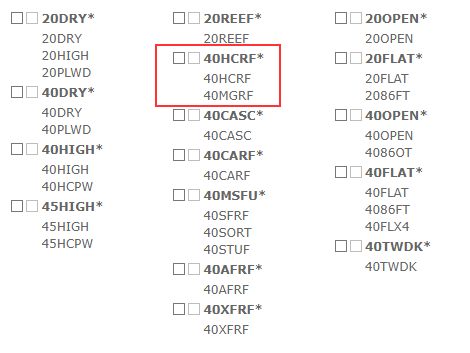
The specific rules to map equipment from RKEM into ROCK types are documented in RKEM Mapping.
Attachments:
 image2018-9-19_15-57-48.png (image/png)
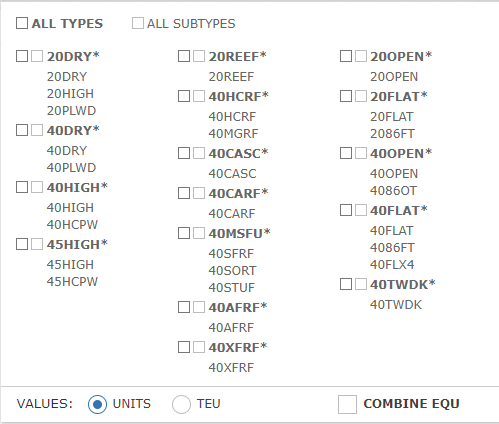 image2018-9-26_15-38-51.png (image/png)
 image2018-9-26_15-50-59.png (image/png)
 ROCK-RKEM Equipment mapping.xlsx (application/vnd.openxmlformats-officedocument.spreadsheetml.sheet)