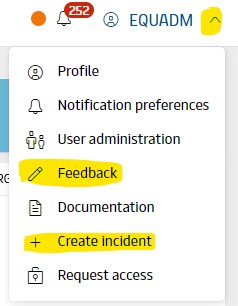
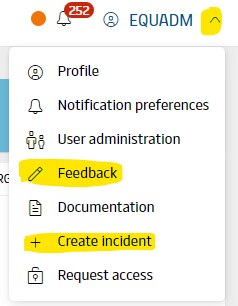
Please use the "Feedback" link for suggestions or questions - often other ROCK users or the ROCK engineering team will engage in the conversation.
The system status in the top right corner shows when the system is operating normally (green), when you should operate with caution (yellow/orange), and when it might be safer not to use the system at all (red). The system status is updated automatically (in case of irregular updates e.g. forecast or TSL) or manually by the engineering team when we are aware of an issue - in both cases, the team is most probably already working on addressing these.
If you think that something is not working correctly in ROCK, you need to create an incident in ServiceNow. Please, follow the "Create incident" link from within ROCK.
Please note that if the problem relates to wrong geographical data:
if data is as-desired in SMDS, but is different in ROCK, please create an incident for us
If the data is not correct in SMDS, please contact your SMDS focal contacts (see below) to update the geography
Attachments:
 image2018-9-27_9-38-34.png (image/png)
 image2018-9-27_9-42-15.png (image/png)
 image2018-9-27_9-44-13.png (image/png)
 top-right-menu.png (image/png)
 EQU GEO master data focal 4.xlsx (application/vnd.openxmlformats-officedocument.spreadsheetml.sheet)
top-right-menu.png (image/png)
EQU GEO master data focal 4.xlsx (application/vnd.openxmlformats-officedocument.spreadsheetml.sheet)
EQU GEO master data focal 4.xlsx (application/vnd.openxmlformats-officedocument.spreadsheetml.sheet)
top-right-menu.png (image/png)
