Introduction
This page describes important part of the logic used to reconcile Load/Disharge events from RKEM into ROCK and onto relevant OTTs.
Contents
High Level Process
This section describes different components used to facilitate the reconciliation process.
Get Batch Data
After receiving the unprocessed RKEM moves, ROCK has a logic to assign a container state for every single move (see RKEM Mapping). Based on these rules, it is possible to deduct exactly when there is a Load or Discharge event. This logic is applied in CDS (our large database for moves processing). To keep performance in ROCK high, containers are grouped together on a set of conditions, so containers load/discharged can approximately be tracked as two rows (also commonly called "deltas"), instead of one row for each container.
The Load and Discharge events co-exist as pairs following the below data format.
Field | Load Delta | Discharge Delta |
|---|---|---|
OTTReconciliationID | 1 | 2 |
LoadSiteCode | ESALRTM | ESALRTM |
VesselCode | 3DM | 3DM |
DepartureVoyageCode | 844W | 844W |
ArrivalVoyageCode | 844W | 844W |
DischargeSiteCode | ? | PAMANTM |
BookingNumber | ? | ? |
OTT_Status | Empty on Vessel Current | Empty on Vessel Complete |
EquipmentType | 45HIGH | 45HIGH |
LoadDate | 13-11-2018 | 13-11-2018 |
DischargeDate | ? | 27-12-2018 |
ContainerCondition | Sound | Sound |
Operator | MSK | MSK |
UnitCount | 20 | 20 |
? = NULL |
Update Baseline
Once a new batch "OTTReconciliation" is received in ROCK, a match summary is generated by comparing load/discharge events with current GSIS schedules. The summary ensures that we only process and include data that has valid schedules. As RKEM quality of routing data on the RKEM moves is sometimes poor, there is a logic to automatically assign the events to the most likely schedules.
The match summary is used to update a baseline for ocean reconciliation. The baseline approach allows us to detect and handle all items that are added/removed/updated.
Invoke Events
The ocean reconciliation baseline is matched against OTTs to identify any changes on the routing information and/or units. If no OTT exists to this combination, a new OTT is created with the associated Load/Discharge numbers.
This process ensure that all relevant Load/Discharge numbers will be reflected in ROCK.
Existing OTT to be Updated | New OTT to be Created (Auto OTT) |
|---|---|
In this case the OTT will have show both the planned figures (i.e. S and A) and the actuals flow (i.e. L and D). The reconciliation occurs even if the target OTT found is flagged as vessel schedule mismatched. 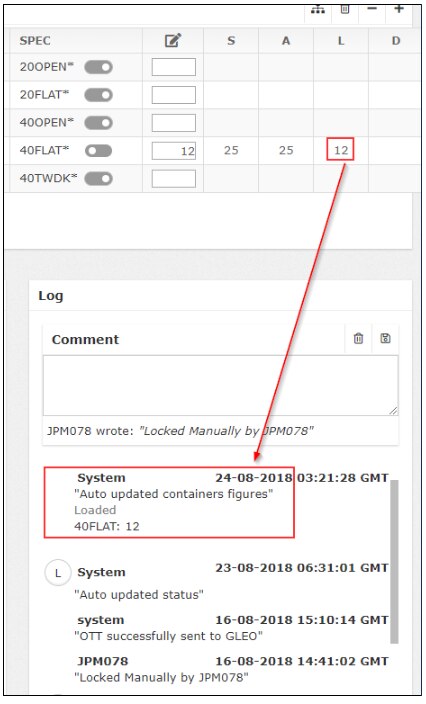 | In this case the OTT will have blank planned figures (i.e. S and A) as the flow was not planned. 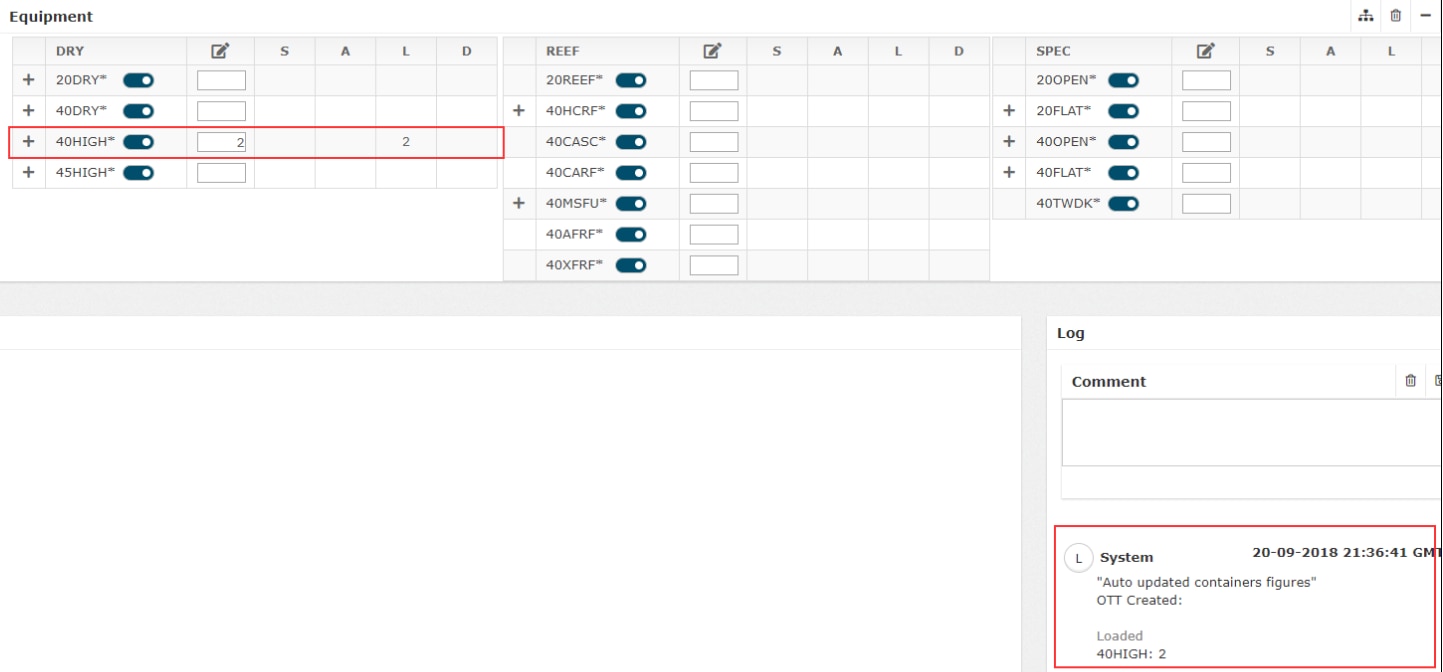 |
Logic Explained
Match Summary
In this step the RKEM moves are matched to GSIS
Step | Details | |
|---|---|---|
| 1 | Get GSIS Schedules | All relevant GSIS scheduled calls info is captured, including relevant poolcode. A few sites are excluded because they are either canals/bunker/OnOff |
| 2 | Get Deltas | All relevant Load/Discharge RKEM deltas are captured, including relevant poolcode info. Some deltas that are seemingly related to vessel calls are excluded when vesselcode is not calling anything in future. This case is typically caused by barge moves in Asia, who is using RKEM in a customized way. |
| 3 | Match Deltas to Origin | First matching step will match and validate the RKEM Origin Call against existing Terminal Calls. SiteMatch: identifies all schedules where
For all schedules matching above criteria, a single schedule is selected based on order:
PoolMatch: as a fallback to SiteMatch, we also identify all schedules where
For all schedules matching above criteria, a single schedule is selected based on order:
Value assignment: Based on SiteMatch and PoolMatch, the below values are assigned based on (1) schedule picked up by sitematch, (2) as a fallback values can also be assigned by poolmatch if nothing was picked up by sitematch. VesselName, ServiceCode, VesselOperator, TransportMode, RouteCode, OriginSiteCode, OriginArrDate, OriginDepDate, OriginArrVoy, OriginDepVoy, OriginDSC, OriginOmit |
| 4 | Match Deltas to Origin | First matching step will match and validate the RKEM Destination Call against existing Terminal Calls. SiteMatch: identifies all schedules where
For all schedules matching above criteria, a single schedule is selected based on order:
PoolMatch: as a fallback to SiteMatch, we also identify all schedules where
For all schedules matching above criteria, a single schedule is selected based on order:
Value assignment: Based on SiteMatch and PoolMatch, the below values are assigned based on (1) schedule picked up by sitematch, (2) as a fallback values can also be assigned by poolmatch if nothing was picked up by sitematch. DestSiteCode, DestArrDate, DestDepDate, DestArrVoy, DestDepVoy, DestDSC |
| 5 | Clean Baseline | In this step, the deltas that have been matched to existing terminal calls at origin and destination are merged into a dedicated table, which consists of all the cleaned deltas for Ocean OTTs. During the merge, rows will be added, remove and updated. Furthermore, all deltas that are older than 6 months, will be removed as well from the baseline. |
Attachments:
 image2019-4-15_8-32-14.png (image/png)
 image2019-4-16_9-30-55.png (image/png)
 image2018-11-28_15-16-11.png (image/png)
 image2018-11-28_15-23-53.png (image/png)
 delta.xlsx (application/vnd.openxmlformats-officedocument.spreadsheetml.sheet)