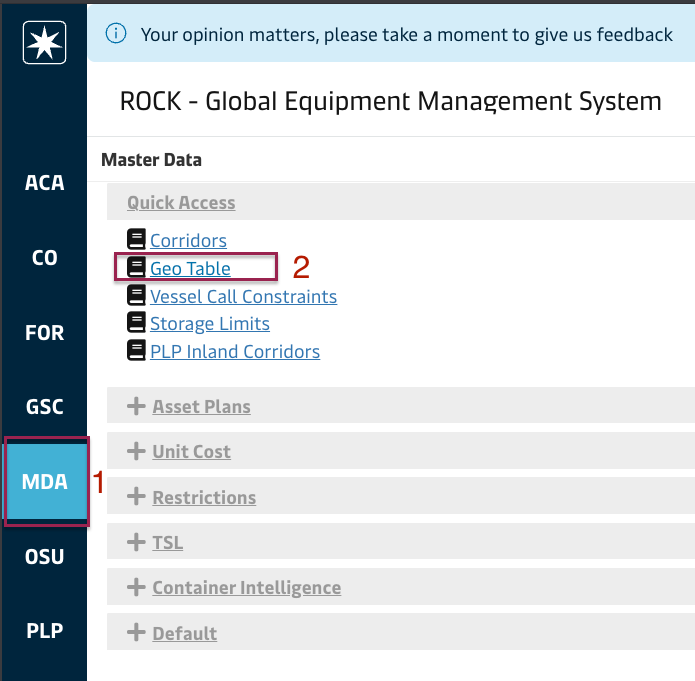
Geo table screen is under Quick Access under Master Data Module:
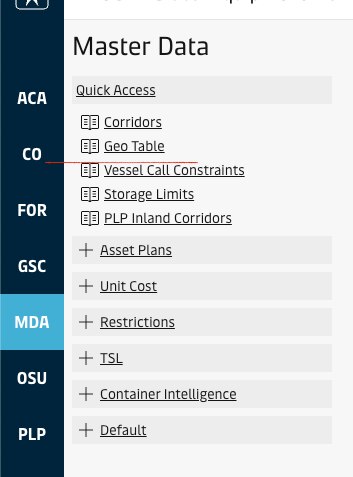
The screen consists of a grid, displaying the raw list of geographies as per the excel file provided by business to a server folder, which is later imported to ROCK automatically. The user can export the data to a CSV file by right-clicking on the grid and selecting Export and CSV Export. Sample geo file: export.csv
Dummy Sites
The geo table features five sites called dummy sites and corresponding pools, with dummy pools attached and no additional parent geo attached. These geo units are provided to users to let them create OTTs that emulate fleet management operations using these as origin or destination sites, so that stock projection is accurate. Example below shows XXNEWBLD file being used to reflect an infleeting operation from the container manufacturer into the site CNTSTMC:
Attachments:
 image2018-9-26_13-22-56.png?version=1&modificationDate=1537960976000&cacheVersion=1&api=v2&width=289&height=250 (image/png)
image2025-3-24_16-52-30.png?version=1&modificationDate=1742831553930&cacheVersion=1&api=v2&width=793&height=250 (image/png)
image2025-3-26_14-3-26.png?version=1&modificationDate=1742994207367&cacheVersion=1&api=v2&width=1097&height=250 (image/png)
image2018-9-26_13-29-17.png?version=1&modificationDate=1537961357000&cacheVersion=1&api=v2&width=304&height=250 (image/png)
Screenshot 2025-05-20 at 13.10.37.png (image/png)
image2018-9-26_13-22-56.png?version=1&modificationDate=1537960976000&cacheVersion=1&api=v2&width=289&height=250 (image/png)
image2025-3-24_16-52-30.png?version=1&modificationDate=1742831553930&cacheVersion=1&api=v2&width=793&height=250 (image/png)
image2025-3-26_14-3-26.png?version=1&modificationDate=1742994207367&cacheVersion=1&api=v2&width=1097&height=250 (image/png)
image2018-9-26_13-29-17.png?version=1&modificationDate=1537961357000&cacheVersion=1&api=v2&width=304&height=250 (image/png)
Screenshot 2025-05-20 at 13.10.37.png (image/png)
 Screenshot 2025-09-04 at 11.49.57 AM.png (image/png)
